What Is an ARN Number and How to Find It
- tech
A quick reference for merchants tracking refunds and fighting chargebacks.
TL;DR
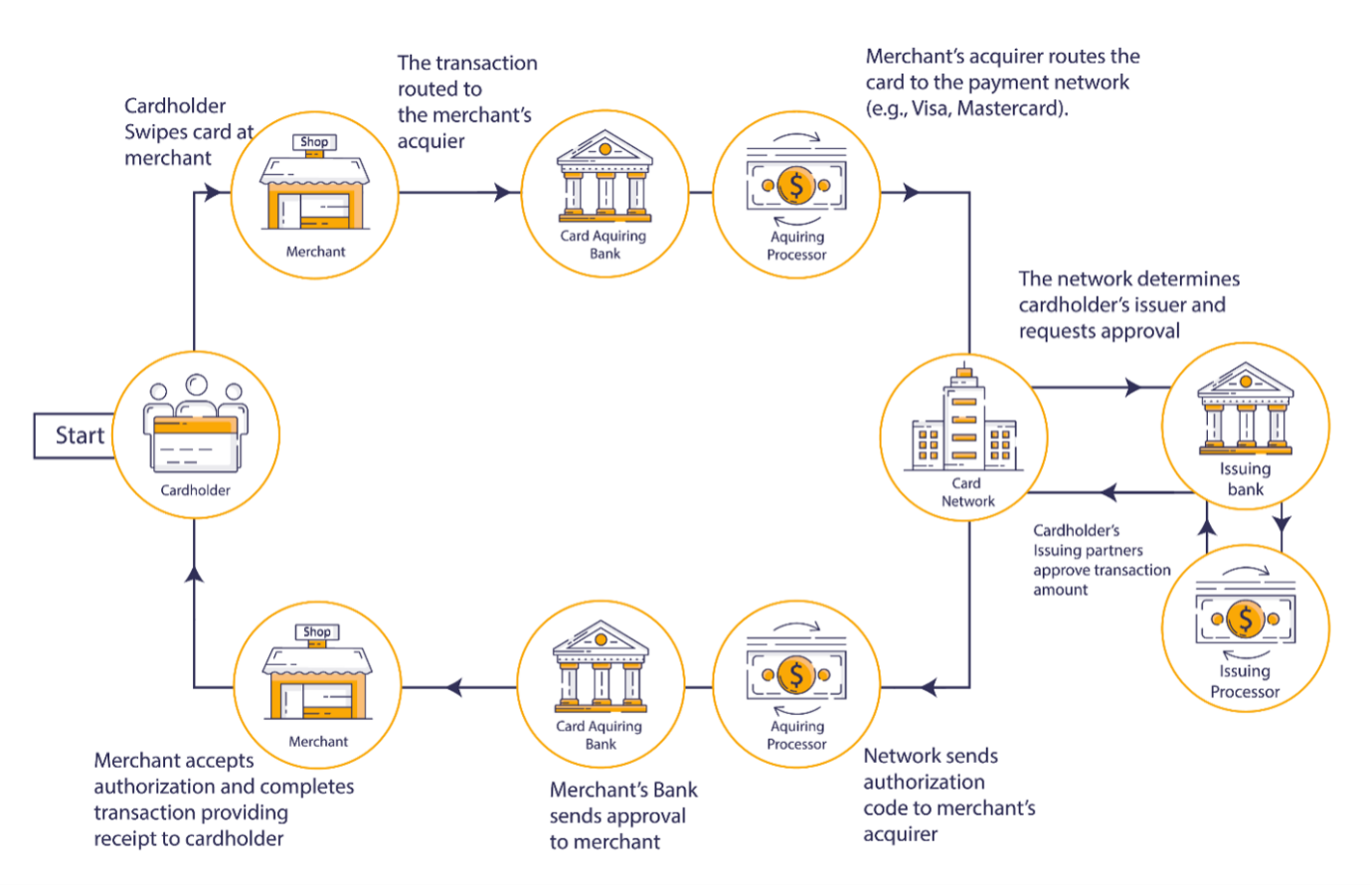
- ARN = Acquirer Reference Number: a unique ID that tracks a card transaction from the merchant's bank to the cardholder's bank.
- It's 23 digits long. Visa ARNs always start with a
2or a7. - Generated by the payment gateway/acquirer — you don't apply for one, it's created automatically.
- Most useful for tracing refunds and supplying evidence in chargeback disputes.
- Fastest place to find it: your payment processor's dashboard, on a refunded transaction that's at least 3 days old.
What is an ARN number?
An Acquirer Reference Number is a unique identifier assigned to a Visa or Mastercard card transaction. It acts as a bridge between the two banks involved in every card payment:
- Acquiring bank — the merchant's bank.
- Issuing bank — the cardholder's bank.
Because the ARN follows the money through the entire flow, any party can use it to trace, verify, and audit a specific transaction — which is exactly what you need when a payment goes sideways.
Key facts:
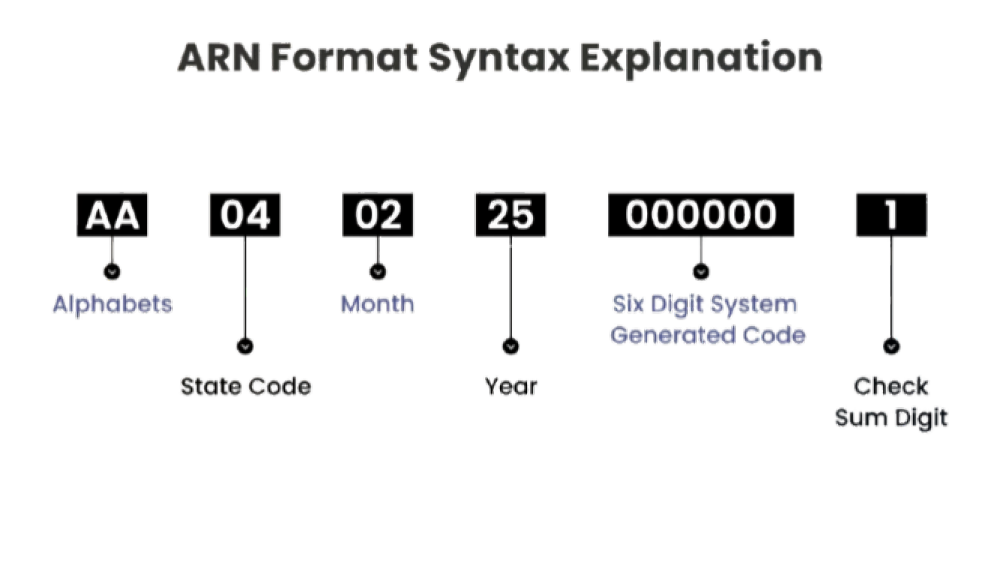
- Length: 23 digits (alphanumeric in some networks, numeric for Visa).
- Visa prefix: always begins with
2or7. - Who creates it: the payment gateway / acquirer, automatically.
- When: typically at settlement — for refunds, it usually appears ~3 days after the refund is issued.
- Networks: applies to Visa and Mastercard credit/debit card transactions.
ARN vs. Transaction ID (they are not the same)
A common mix-up. Quick distinction:
- Transaction ID — an internal reference used by a payment system (gateway, processor, your own DB) to identify a transaction within that system.
- ARN — a network-level reference the acquiring bank assigns so the transaction can be traced between banks, across the card network.
Rule of thumb: use the Transaction ID to find a payment in your tools; use the ARN when you need banks to talk to each other about it.
What is an ARN used for?
- Tracing refunds. If a customer says "I never got my refund," the ARN lets either bank locate exactly where the money is in the pipeline.
- Chargeback disputes. Submit the ARN as evidence so the issuer can investigate and validate a transaction's legitimacy.
- Fraud investigation. A shared reference point for flagging and tracking suspicious or unauthorized transactions.
- Reconciliation at scale. A reliable per-transaction handle when you're managing high volume.
- Other money movement. Also used to verify electronic funds transfers and partial settlements.
The refund status states you'll actually see
When you look for an ARN on a refund, the processor usually shows one of three states. Knowing them saves a support ticket:
- ARN not available → the refund completed before the original charge settled, so the authorization was simply reversed. No ARN is generated — this is normal.
- ARN processing → the refund is in flight but hasn't finished. Check back.
- ARN available → the number is ready to copy.
Takeaway: if there's no ARN, it's often because the refund happened too fast to need one — not because something broke.
How to find an ARN number (step by step)
The universal recipe, regardless of platform:
- Open your payment processor / gateway dashboard.
- Go to Transactions → Refunds (or filter orders by refund status).
- Pick a refund that is ≥ 3 days old and ≤ 120 days old.
- Filter by card brand = Visa if you specifically need a Visa ARN.
- Open the transaction and look in the payment breakdown / timeline for the ARN field.
- Copy it — and sanity-check: 23 digits, starting with
2or7for Visa.
Below are the two most common platforms.
Finding an ARN in Stripe
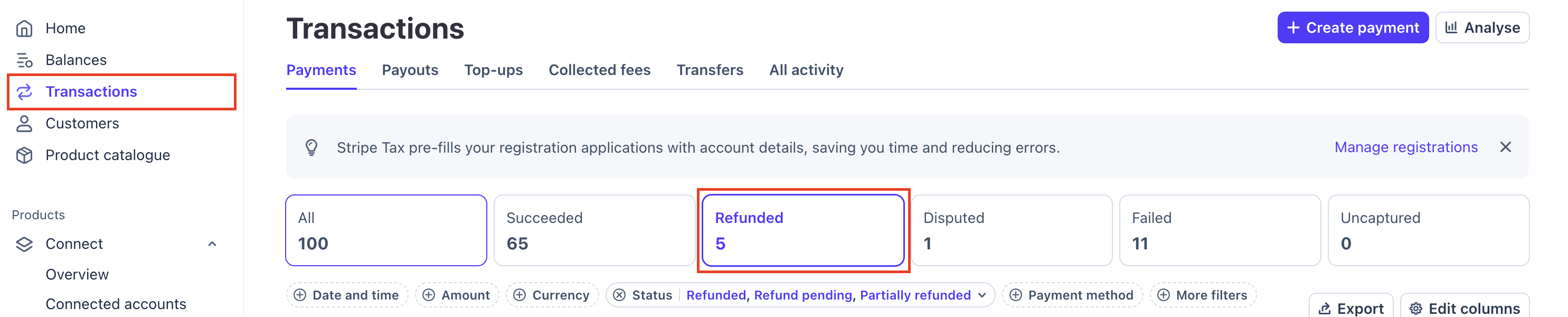
- Open your Stripe dashboard → Transactions tab → Refunds.
- Apply these filters:
- Refunds issued at least 3 days ago (the ARN appears after this).
- More filters → Card brand → Visa.
- Date and time → is in the last → 120 days.
- Click a matching refund to open it.
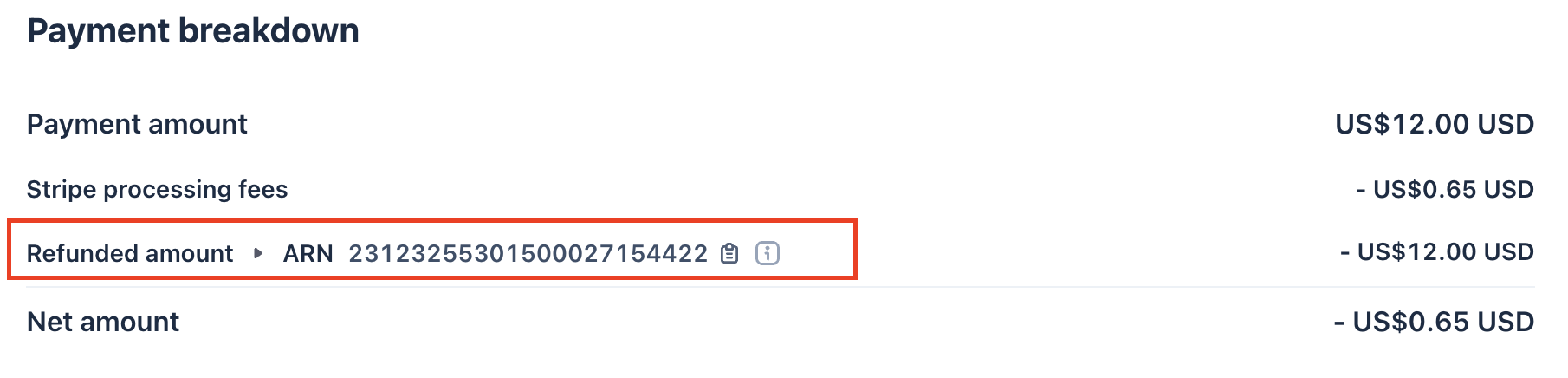
- Find the ARN under the Payment breakdown section.
Finding an ARN in Shopify
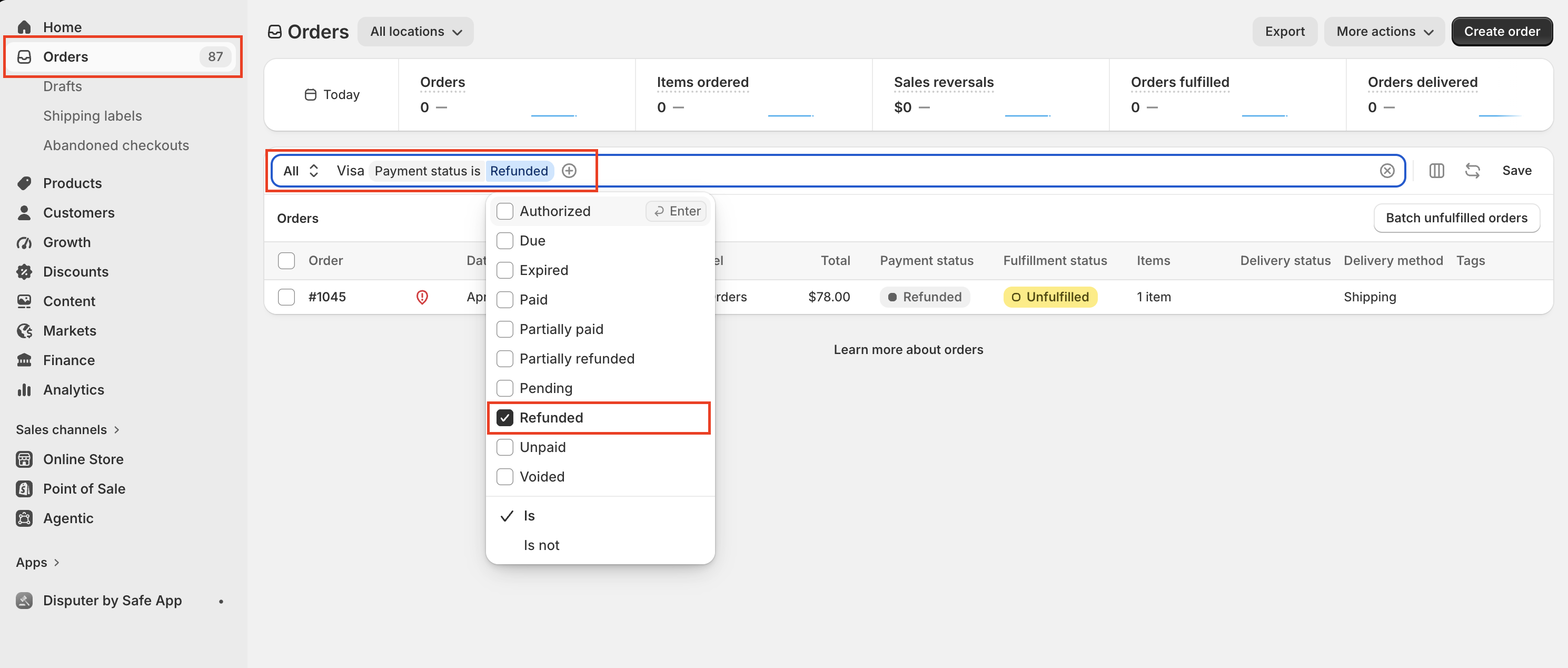
- Log in to Shopify → Orders.
- In the search bar, type VISA to filter to Visa transactions.
- Apply a Payment status filter and select Refunded.
- Open a refunded order that's ≥ 3 days but ≤ 120 days old.
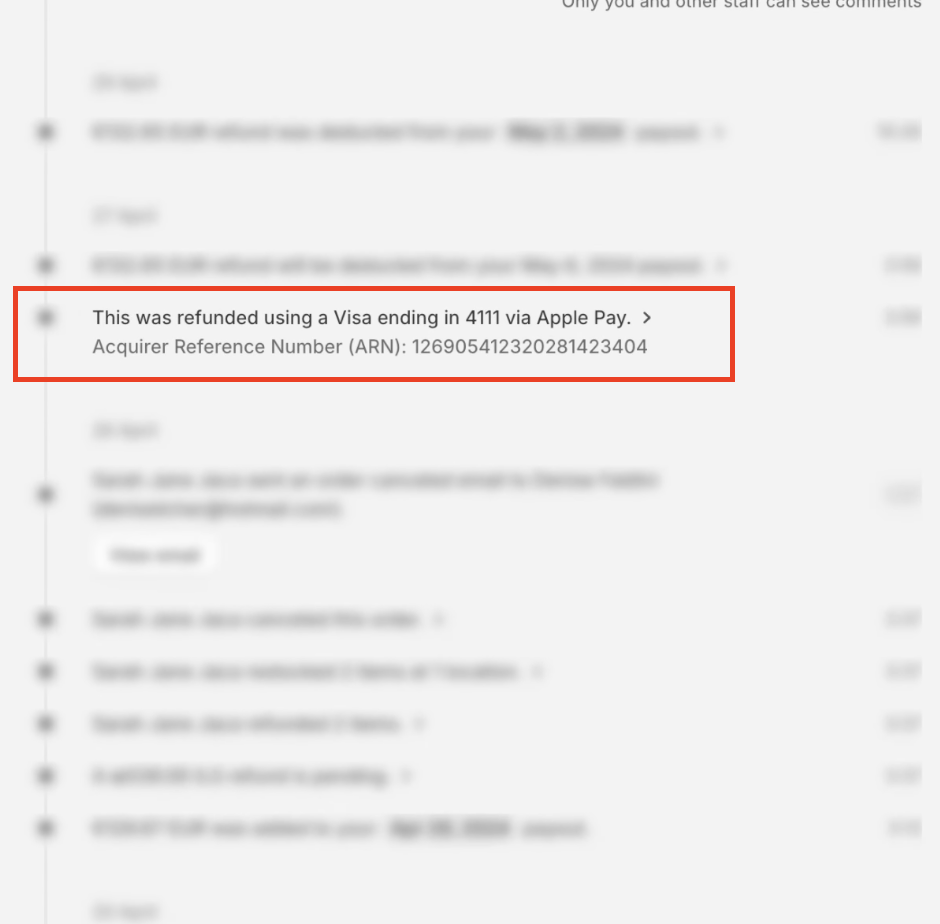
- Scroll to the order timeline — the ARN appears there.
Other places to find an ARN (cardholder side)
If you're the customer — or helping one — the ARN usually lives in:
- Bank SMS / email transaction alerts.
- Net banking portal or mobile banking app transaction history.
- UPI / wallet app payment details (in markets where applicable).
- Customer support — call the bank or processor with the transaction date, amount, and last 4 digits.
No refunds or Visa transactions yet? Generate an ARN
If your account is new and you have nothing to pull from:
- Run a test transaction on your own store with your own Visa card.
- Wait at least 3 days, then issue a refund (refunds newer than 3 days often won't show an ARN).
- Check the refunded transaction 2–4 days later — the ARN should now appear in your processor.
- Still nothing? Contact your processor and request the ARN for that specific refunded transaction.
Faster path for validation (skip the ARN hunt)
Some services (e.g., alert/chargeback-prevention providers) need ARNs to validate your merchant profile — but usually accept an alternative:
- Provide your MCC, CAID, and BIN details instead.
- Get these from your payment processor's support team.
- This lets the provider skip ARN validation and move straight to enrollment.
Trade-off: supplying MCC/CAID/BIN directly is often faster than gathering three valid ARNs, since ARN validation can add extra business days.
Troubleshooting cheatsheet
- "ARN not available" on a refund → likely reversed before settlement. Expected; no number exists.
- Refund is <3 days old → too early. Wait and re-check.
- Number isn't 23 digits / doesn't start with 2 or 7 → it's probably a Transaction ID or auth code, not a Visa ARN.
- Can't find the field anywhere → contact the processor with the date, amount, and last 4 digits and request the ARN.
- Transaction is >120 days old → some dashboards age it out; pull it via support instead.